
Your business needs a UPS system
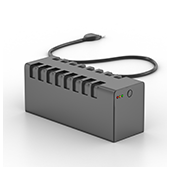 For some businesses, power loss could result in profit loss. Natural disasters such as storms and hurricanes, construction or utility accidents, and other unforeseeable technical failures can put your business’s operations to a grinding halt. Businesses that depend on a continuous power supply to function might endure a slight disruption, but some might not. With an Uninterruptible Power Supply (UPS) system, damages caused by power failure can be avoided altogether.
What is an uninterruptible power supply?
An uninterruptible power supply is an essential piece of hardware that protects both your computer and your data. It provides a backup power source in case of main power failures caused by electrical current problems such as blackouts, brownouts, and power spikes.
Smaller UPS units can protect individual computers while larger models can power multiple devices or an entire office. Small businesses can opt for individual UPS units, which should be enough to back up critical computers and other devices that are key to business continuity.
Benefits of having UPS
It’s a known fact that power outages can damage or completely destroy electronic equipment, especially computers. Unexpected computer shutdown can cause great damage to your computer hardware and make you lose unsaved data. A UPS ensures you never experience such a scenario.
Here are other ways that a UPS benefits your systems:
-
Uninterrupted power flow during power surges
When you have UPS, the voltage that passes from the main electrical lines to your devices is consistently stabilized. This protects your computers from power surges, which happen when the voltage in other equipment suddenly rises.
-
Refined and filtered power supply
It normalizes power levels so that your computers are protected against dips and spikes caused by lightning or an abnormal power supply that usually comes from restored power after a blackout.
-
Instant power during brownouts
An uninterruptible power supply guarantees your operations’ continuity. In the event of short-term interruptions, it gives you enough time to switch to a larger, more stable power supply such as a generator. But unlike a generator, it provides instant power to your equipment at the exact moment the power goes out.
Does your business need a UPS?
If you’re purchasing new computers for your small business, a UPS is an invaluable add-on. Businesses that require constant power to function such as hospitals, banks, academic institutions, manufacturing companies, and any business for which storing and processing data are critical tasks can benefit from uninterrupted power.
Determining the type of UPS for your business as well as installing and maintaining it may require the expertise of professionals. We have experts who could provide you with information on properly operating a UPS, replacing its battery, identifying devices that should never be connected to it, and other safety tips. Call us today for advice.
Published with permission from TechAdvisory.org. Source.
 The waitlist for Pinterest’s latest “DIY Promoted Pins” tool is proof of how eager small- and medium-sized businesses are when it comes to social media marketing. Establishing a solid online presence, promoting corporate content, and driving website traffic at the same time is every business owner’s dream come true. Here are some pointers to keep in mind.
 Security professionals should be beefing up your network security, implementing advanced firewall software, and identifying risks for possible breaches. In reality, they spend a huge chunk of their time troubleshooting issues on individual personal computers (PCs). That workflow is not ideal, but that’s what normally happens in many organizations. At what cost? Read on to find out.